UPDATE: THE NEW ADD-ON IS HERE! May 4, 2025
 New Gallery Feature: Upload to Multiple Categories!
Hey scrappy friends!
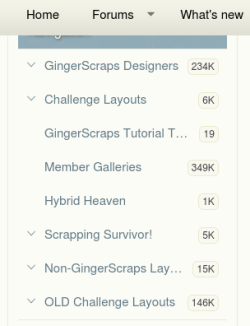
We’ve added a super handy new feature to our gallery, and I think you're going to love it! You can now upload your layout to multiple categories at once! This is perfect if your layout fits more than one designer and challenge.
Here’s a quick tutorial to help you use this new feature:
Important Reminder for Uploading Layouts
We know some of you are feeling a little frustrated trying to figure out how to upload a page that fits into multiple categories. Unfortunately, that's not possible right now — but don't worry! We have an add-on coming soon that will fix this.
I don’t have an exact ETA yet, as the forum/gallery expert I hired is sick and unable to work at the moment. But as soon as he’s feeling better, we’ll get this sorted out.
In the meantime, please just upload your page once and choose the best-fitting category — usually either a designer or a challenge category.
If you've already uploaded the same page multiple times, no worries — you don’t need to delete anything. Just moving forward, please upload each page only once.
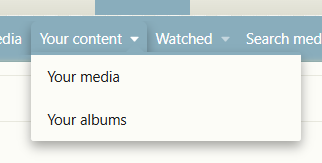
 Friendly Reminder: Everything you upload will automatically show up in your "Media" section, so there's no need to select the "Member Gallery" like we used to in the old system.
Thanks so much for your patience and understanding! We really appreciate you.
 New Gallery Feature: Upload to Multiple Categories!
Hey scrappy friends!
We’ve added a super handy new feature to our gallery, and I think you're going to love it! You can now upload your layout to multiple categories at once!
This is perfect if your layout fits more than one designer and challenge.Here’s a quick tutorial to help you use this new feature:
 Uploading to Multiple Categories
- Start your layout upload as usual.
- When you get to the category selection area, simply:
- Hold down Command (⌘) on a Mac
- Or...
- GingerScraps
- Replies: 19
- Forum: Site Tutorials, News & Announcements


Important Reminder for Uploading Layouts
We know some of you are feeling a little frustrated trying to figure out how to upload a page that fits into multiple categories. Unfortunately, that's not possible right now — but don't worry! We have an add-on coming soon that will fix this.
I don’t have an exact ETA yet, as the forum/gallery expert I hired is sick and unable to work at the moment. But as soon as he’s feeling better, we’ll get this sorted out.
In the meantime, please just upload your page once and choose the best-fitting category — usually either a designer or a challenge category.
If you've already uploaded the same page multiple times, no worries — you don’t need to delete anything. Just moving forward, please upload each page only once.
Friendly Reminder: Everything you upload will automatically show up in your "Media" section, so there's no need to select the "Member Gallery" like we used to in the old system.Thanks so much for your patience and understanding! We really appreciate you.
Last edited: