• 🆘 Need Help? We’re Here for You!

    Have a question or need assistance? You’re in the right place! Whether you're new to GingerScraps or just need a little guidance, feel free to ask here. Our amazing admins and helpful community members are always happy to lend a hand. 💖

    Be sure to check out these helpful areas too:

    🔧 If you’re having trouble with an order or product download, please visit our Support Desk - we’re happy to help!

Important Reminder for Uploading Layouts

GingerScraps

Administrator
Staff member
UPDATE: THE NEW ADD-ON IS HERE! May 4, 2025


Important Reminder for Uploading Layouts

We know some of you are feeling a little frustrated trying to figure out how to upload a page that fits into multiple categories. Unfortunately, that's not possible right now — but don't worry! We have an add-on coming soon that will fix this.

I don’t have an exact ETA yet, as the forum/gallery expert I hired is sick and unable to work at the moment. But as soon as he’s feeling better, we’ll get this sorted out.

In the meantime, please just upload your page once and choose the best-fitting category — usually either a designer or a challenge category.

If you've already uploaded the same page multiple times, no worries — you don’t need to delete anything. Just moving forward, please upload each page only once.

📌 Friendly Reminder: Everything you upload will automatically show up in your "Media" section, so there's no need to select the "Member Gallery" like we used to in the old system.

Thanks so much for your patience and understanding! We really appreciate you. ❤️
 
Last edited:
I have a question about the "Member Gallery". I often add layouts that I've done for a challenge at other sites to my Member Gallery. I haven't been able to find a way to access my Member Gallery to do that now. Is that feature gone for good? In other words do I have to have a Ginger Scraps gallery to upload to and no longer can upload anything not created for a GS challenge or not using any GS designers?
 
I have a question about the "Member Gallery". I often add layouts that I've done for a challenge at other sites to my Member Gallery. I haven't been able to find a way to access my Member Gallery to do that now. Is that feature gone for good? In other words do I have to have a Ginger Scraps gallery to upload to and no longer can upload anything not created for a GS challenge or not using any GS designers?
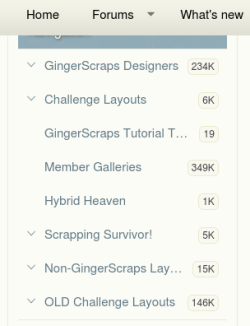
at the top click Media, then at the left search Non-GingerScraps layouts, click on it
1 non.png
the gallery it will open add your layout clicking "Add Media", add credits but not outside links
2 non.png
 
Thank you so much for the update!!
If I only uploaded to member gallery then shared to the challenge thread, should I change it from member gallery to the related challenge gallery?
 
Important Reminder for Uploading Layouts

We know some of you are feeling a little frustrated trying to figure out how to upload a page that fits into multiple categories. Unfortunately, that's not possible right now — but don't worry! We have an add-on coming soon that will fix this.

I don’t have an exact ETA yet, as the forum/gallery expert I hired is sick and unable to work at the moment. But as soon as he’s feeling better, we’ll get this sorted out.

In the meantime, please just upload your page once and choose the best-fitting category — usually either a designer or a challenge category.

If you've already uploaded the same page multiple times, no worries — you don’t need to delete anything. Just moving forward, please upload each page only once.

📌 Friendly Reminder: Everything you upload will automatically show up in your "Media" section, so there's no need to select the "Member Gallery" like we used to in the old system.

Thanks so much for your patience and understanding! We really appreciate you. ❤️

Thank you! I had a little panic at first because I couldn't find all of my layouts but then realized I CAN when I look at "your media" instead of "your albums."
It also took me a bit to notice the drop-down arrow next to the tabs/sections. So many cool new things!

1742162952027.png
 
  • Like
Reactions: Gen
Thank you so much for the update!!
If I only uploaded to member gallery then shared to the challenge thread, should I change it from member gallery to the related challenge gallery?
Yes, Angbrey. When you post your layout to the challenge gallery, your layout will automatically post to your member gallery. You can always find all of your layouts by choosing the "your content" dropdown from the blue bar at the top of the gallery page. Remember, you must be logged in to do this.
 
Thanks for the update. Any new platform will come with some growing pains, and I so appreciate you spelling things out for us!
 
Yes, Angbrey. When you post your layout to the challenge gallery, your layout will automatically post to your member gallery. You can always find all of your layouts by choosing the "your content" dropdown from the blue bar at the top of the gallery page. Remember, you must be logged in to do this.
Thank you Carla ♥
 
I personally am finding this new gallery to be a wonderful upgrade. It was easy to figure out for me and I usually have a hard time with these types of changes. I am really loving it. Sorry your tech got sick. Hope he or she is getting better.
 
I too hope that your technician is getting better.
I too ❤️ the new forum :love:
 
read this AFTER i posted to the new gallery (of course, i always follow instructions AFTER i do something!). and yes, i was wondering about the posting to different galleries so that question is answered. but everything went smoothly in the upload. the only thing i don't like about our own galleries is not seeing the number of views or comments without hovering. BUT i'm sure i will get over it. i did like the old LO look better but i know i'll get used to this one too. and i appreciate all the time and effort into the remake!
 
read this AFTER i posted to the new gallery (of course, i always follow instructions AFTER i do something!). and yes, i was wondering about the posting to different galleries so that question is answered. but everything went smoothly in the upload. the only thing i don't like about our own galleries is not seeing the number of views or comments without hovering. BUT i'm sure i will get over it. i did like the old LO look better but i know i'll get used to this one too. and i appreciate all the time and effort into the remake!
Glad to hear your upload process when smoothly! I have an inquire out about the hovering to see comments, hopefully we can modify that :)
 
Glad to hear your upload process when smoothly! I have an inquire out about the hovering to see comments, hopefully we can modify that :)
Ginger ... OMG!!! just looked at my gallery and i'm seeing the little icon that shows when there's been a comment (plus the other icons there). love this view so much! since Ginger Scraps is pretty much the only place i post, the little details matter a lot to me. THANK YOU!!!
 
Hey everyone... LOOK HERE!!
 
Last edited:
Back
Top