• 🆘 Need Help? We’re Here for You!

    Have a question or need assistance? You’re in the right place! Whether you're new to GingerScraps or just need a little guidance, feel free to ask here. Our amazing admins and helpful community members are always happy to lend a hand. 💖

    Be sure to check out these helpful areas too:

    🔧 If you’re having trouble with an order or product download, please visit our Support Desk - we’re happy to help!

Changing signature

alexandergirl68

Active member
I just did a new signature for the signature challenge that I would like use to update my signature. I did change mine when we started the new site last month but I am having trouble now trying to figure out how to change it.
Could someone help me with this? Thanks.
 
No problem! Here are some instructions, if you still have trouble, let me know :)

I also made a video : https://forums.gingerscraps.net/thr...guidelines-tutorial-updated-april-2025.79155/

How to Change Your Signature

A signature is a personalized block of text, images, or links that appears under your posts. Here’s how to update yours:

1️⃣ Open Your Signature Settings

  1. Log in to the forum.
  2. Click on your avatar or username in the top-right corner.
  3. In the dropdown menu, click "Signature" (or visit: https://forums.gingerscraps.net/account/signature).

2️⃣ Edit Your Signature

  1. In the signature editor, type your new text, links, or insert images.
  2. Use the formatting toolbar to:
    • Change fonts, colors, and alignment
    • Add clickable links (🔗 button)
    • Insert images (🖼️ button)
    • You will notice 3 dots in the toolbar that you can click on for more options.

3️⃣ Save & Apply Changes

  1. Click "Save" to update your signature.
  2. Your new signature will now appear on your posts.
 
Last edited:
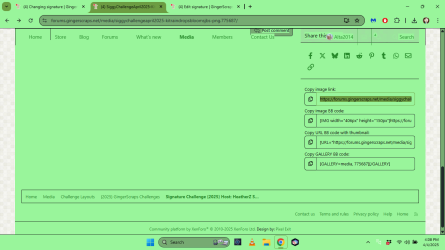
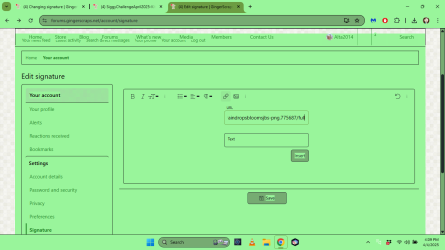
I'm trying to add the signature that I made for the Signature Challenge. I tried to insert the image but it came up with a small picture icon with a x on it. When I put the https address from either the challenge page or the gallery page only the Https address shows up.
I always have problem with changes. Thank you for any help.
 
Here is a video :) I hope it helps!

 
Here is a video :) I hope it helps!

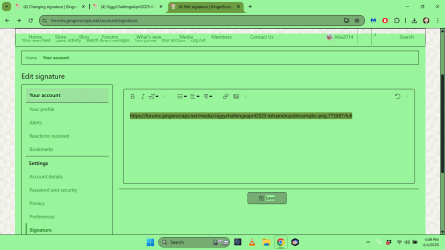
I followed the instructions and only the link is shown, siggy is smaller than the size required and still not working for me.
 
Would you be able to make me a video or some screenshots of what you are doing? Are you getting an error? Where is your image from, is it from the GS gallery or an offsite URL?

Give me as much detail as you can so I can try to figure out what's happening.
 
Would you be able to make me a video or some screenshots of what you are doing? Are you getting an error? Where is your image from, is it from the GS gallery or an offsite URL?

Give me as much detail as you can so I can try to figure out what's happening.
I got the siggy from the gallery here... and when I add the link in the signature box I get the 3rd screenshot.
 

Attachments

  • Screenshot (108).png
    Screenshot (108).png
    137.5 KB · Views: 8
  • Screenshot (109).png
    Screenshot (109).png
    133 KB · Views: 8
  • Screenshot (110).png
    Screenshot (110).png
    132.4 KB · Views: 8
Is there an option to edit your siggie before committing it? I didnt find one.
 
Is there an option to edit your siggie before committing it? I didnt find one.
I'm not sure what you mean? You should see it exactly as it will be when you are creating it in the editor box. I'm tired and just about to go to sleep, so I might just not be understanding what you are asking.
 
@Jill You can edit it in the gallery. But I think in your profile - Signature box you would have to delete and add an updated one.
You can change the size after you add it to the Signature box. click on your added image and you will see a box with items - the arrows are the one to resize.
 
thank you so much for the video, I changed my siggy without issues :)
 
@Jill You can edit it in the gallery. But I think in your profile - Signature box you would have to delete and add an updated one.
You can change the size after you add it to the Signature box. click on your added image and you will see a box with items - the arrows are the one to resize.
I really meant preview A-M but thanks for the input. I wanted to see if the image showed or just the text. I guess what you see in the upload window is what you get. More investigation needed.

@GingerScraps Regarding the siggie size and referring to my own as it is currently, do the new requirements mean that my blinkies have to go? My graphic is 600x150 and the blinkies are extra. My little siggie character will be very tiny if I have to squish her up to fit into 600 x100 or however much space the blinkies take up. Confused :confused:
 
I really meant preview A-M but thanks for the input. I wanted to see if the image showed or just the text. I guess what you see in the upload window is what you get. More investigation needed.

@GingerScraps Regarding the siggie size and referring to my own as it is currently, do the new requirements mean that my blinkies have to go? My graphic is 600x150 and the blinkies are extra. My little siggie character will be very tiny if I have to squish her up to fit into 600 x100 or however much space the blinkies take up. Confused :confused:
As it right not it is a little loo large (the height, not width), can you try putting one blinkie on each side of your graphic? You could remove the Survivor blinkie. Give that a try and see how it looks :) Or you can shrink your graphic a little smaller. It's not a lot too big just the height of the blinkies. I not going to be crazy monitoring everyone, but would like it if people can stay within the max size.
 
@GingerScraps (I am a bit proud of the Survivor 7 blinkie seeing as I won that one:)..I was actually thinking about how to add a winner banner across it ..except I dont know how to do animations..to take the place of the absent avi title...self indulgent what??!?!?:D..no wonder I use a siggie graphic with a big head 🙄 ) What is the pixel height size of the blinkies, how can I find that out. I might try to squish the whole lot into the 150 height and see how that looks.
 
Last edited:
OK so little Jill and her April play things are now 100px high, she lost a bit of width (I wish that were the case in real life..lol). How can I tell if the whole lot fits into 150 px high? I Rclicked and saved one of the blinkies to my computer and did image size search which said it was 50px high which would be fine if that is correct....I think I am going down a rabbit hole here......I need a LIFE!!
 
OK so little Jill and her April play things are now 100px high, she lost a bit of width (I wish that were the case in real life..lol). How can I tell if the whole lot fits into 150 px high? I Rclicked and saved one of the blinkies to my computer and did image size search which said it was 50px high which would be fine if that is correct....I think I am going down a rabbit hole here......I need a LIFE!!
Looks PERFECT!! I'm happy you kept that Survivor blinkie too! :)
 
Can someone help me? My siggy is old and doesn't work. It just shows up as the file name. When I go to edit it, my box is blank so there is nothing to delete to get rid of this thing.
 
Back
Top