DebraB

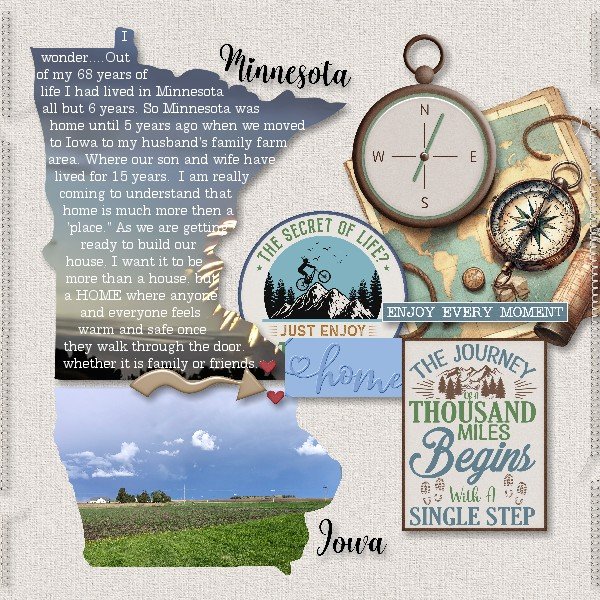
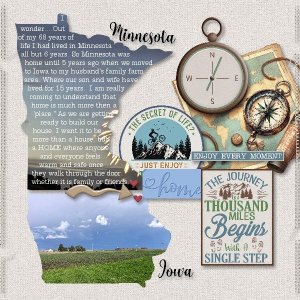
Moving from MN to IA

  • Media owner DebraB
  • Date added
First Credit and Thanks go to Grace who helped me tremendously accomplish converting png files into svg so I could get it to work in my software. getting the text to fit the shape of MN
Links, Credits & Journaling
Kits used from Let Me scrapbook Trail Mix Bundle https://store.gingerscraps.net/Trail-Mix-Bundle-by-Let-Me-Scrapbook.html
Let Me Scrapbook: Together Again States 1 https://store.gingerscraps.net/Together-Again-States-1-by-Let-Me-Scrapbook.html
Kit: Dear Friends Designer: Nifty 50: Minnesota https://store.gingerscraps.net/Nifty-50-Minnesota.html
Really like your journaling with in the Minnesota state shape. Like the Iowa state shape with the photo of the farm and like your great big element cluster on your page. Such a great page.
 
So this is what you wanted to do with the state shapes. It all looks great. What lovely heartfelt journaling which I did enjoy reading.
 
Wonderful! I loved how it turned out, so beautiful! I hope you will print it. Thank you so much for all the hard work you did creating this pretty page, it was a pleasure work together with you. I really love how you paired the beautiful photo and the journaling, so touching. So creative that you included Minnesota and Iowa shapes, so dynamic, brilliant!. Gorgeous clustering, love it :love:
 
Last edited:
This is such a neat page. I like how you used the state shapes. I like the picture of the farm, and I really like the different compass embellishments that you used for the page.
 
Meant to ask how did you get all of the journaling in the MN state? I have never been able to figure that out also like doing text on a curve and such. Might be because I use a pse 7 program
 
@Windswept I use My Memories so it was a bit difficult until @Grace helped with the program. I had to convert the png file (of the state image) to an svg file. Attached the picture I wanted/or paper. 2nd I uploaded the svg file a 2nd time, made the opacity to 1. Then I inserted a text box, wrote what I wanted to say. Then clicked on the text box, then hold down shift key and click on svg file that has 1 opacity. choose the "ATTACH TEXT TO SHAPE". Since there is very little opacity you then move it over the original picture of the state.
BUT if you are using PSE do a google search as 'pse attach text to shape' and/or 'pse attach text to curve' the directions sounded much simpler.
 
Oh, I didn't know there's another Grace, the only difference is a dot at the end of my name. @DebraB dear, it was a real pleasure work together with you, and I LOVE :love: how it turned out! your clustering is really beautiful and the shapes very eye-catching.
 
I am in awe of how this layout turned out, @DebraB! What a beautiful memory page to record this big move and life change! It's so cool how you used the state shapes for your words and the picture (I'm guessing) of your new, wonderful farm and now home! Great, great job!
 

Media information

Category
Let Me Scrapbook
Added by
DebraB
Date added
View count
321
Comment count
10
Rating
0.00 star(s) 0 ratings

Image metadata

Filename
TESTING ALBUM-012.jpg
File size
143.1 KB
Dimensions
600px x 600px

Share this media

Back
Top