• 🆘 Need Help? We’re Here for You!

    Have a question or need assistance? You’re in the right place! Whether you're new to GingerScraps or just need a little guidance, feel free to ask here. Our amazing admins and helpful community members are always happy to lend a hand. 💖

    Be sure to check out these helpful areas too:

    🔧 If you’re having trouble with an order or product download, please visit our Support Desk - we’re happy to help!

Forum & Gallery Troubleshooting Zone: Report Bugs, Gremlins & Glitches

Kristi, I just clicked on the reply button in your post and it has quoted it. That would be the same if you clicked on the reply button on the opening post.
When you open a thread it should take you to the last posting, so no need to scroll to the bottom of a lot of postings.
Right, but I am looking for a way to reply without quoting the original post and without having to scroll to the bottom of the thread.
There used to be two reply options, one with the quote and one without.
Many of my replies are to the challenge threads and I don't need the original challenge info listed with my reply. I know I could reply and delete all of that info but I feel like there is probably an easy way to simply post a new reply to a thread without a quote but I can't seem to find one.
 
@Kristi Martin I am not sure what you are wanting to do. If you do not want to include the quote you just type in the reply box which you have been doing. If you want to draw the attention of someone you type the @ symbol and their user name like I have done in this reply.
 
@Kristi Martin I just noticed that at the top of some threads you can see a "Jump to New" on the right beside "Watch" and if you click on "Jump to New" it will take you to the bottom.
 
@Kristi Martin I just noticed that at the top of some threads you can see a "Jump to New" on the right beside "Watch" and if you click on "Jump to New" it will take you to the bottom.


As mentioned in the old forum software there used to be two reply buttons one to quote and one to jump to the new empty reply box. The "reply" used to automatically take you to the reply box without quoting anyone which is what I am looking for now. Jump to New doesn't help because it only takes you to the newest reply since the last time I viewed the thread and not the place to type a new reply.

When replying to a challenge thread I don't need to quote anything or draw attention to anyone so being able to quickly hit a button to jump to an empty reply box is convenient but if that is not an option I can just scroll down until I get to it.
 
@GingerScraps I am guessing the gallery man is still sick. If it is okay can I just copy and paste my layout into the challenge that I made it for even tho I have it listed under a designers name? Then post the layout link also in the cookie challenge thread?
 
@GingerScraps I am guessing the gallery man is still sick. If it is okay can I just copy and paste my layout into the challenge that I made it for even tho I have it listed under a designers name? Then post the layout link also in the cookie challenge thread?
Yes! You can post your challenge layouts and cookie jar links, no matter what gallery they are uploaded to.
I got a reply from the gallery guy he is just starting to get back to work, but still no ETA on when we will get the add-on. I actually found out it might not be so simple either. All the other sites that use XenForo (the new gallery platform) and have the ability to upload to multiple galleries, they are using an old/outdated version of the platform. So the add-on they use will not work for us. Crossing my fingers it won’t cost an arm and leg to have someone create that add-on for us. Hopefully I’ll have answers within the next few weeks!
 
How do you send a direct message to a designer to ask a question?
I just created a list of all the designers forum usernames :)


To send a DM you click the little envelope up in the navigation bar, select "send direct message" then input the designers username, type in your message and send! :)

If you DM a designer and don't get a reply in 48-72 hours, you can always reach out to me via DM or the support ticket system.
 
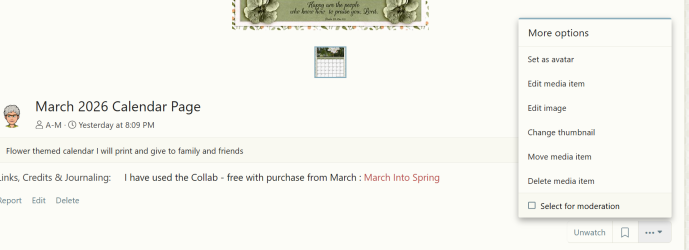
@GingerScraps sorry to have to point this glitch out to you but it is an important one. Jill tried to edit an image of hers in the gallery but could not - she had to delete that along with its information and upload the corrected image and input information again. I thought she may have been doing it wrong but I had a play where I thought we could do it - see my screen shot but neither the "edit image" or "edit media item" works for uploading a corrected layout.
1744006007969.png
 
@GingerScraps sorry to have to point this glitch out to you but it is an important one. Jill tried to edit an image of hers in the gallery but could not - she had to delete that along with its information and upload the corrected image and input information again. I thought she may have been doing it wrong but I had a play where I thought we could do it - see my screen shot but neither the "edit image" or "edit media item" works for uploading a corrected layout.
View attachment 773160
This is actually just how the gallery is set up (according to the XenForo manual) You can edit the title, credits, description but you can not replace the image with a new upload. To replace an image you will have to delete the old one and upload the new one.

Here is a copy and paste :

What users CAN NOT do:​

  • They cannot swap out the original media file (e.g., replace a JPEG with a corrected version).
  • There is no built-in "replace image" feature for regular users in the Media Gallery.

What users CAN do​

  • Edit the title, description, tags, categories, and custom media fields (like your rich text box).
  • Delete the media and re-upload a new version (but they will lose comments, likes, and view count).


These are the reasons Why there is no feature to "replace" an image:
1.

  • Media uploads in XenForo are tied to a unique media ID, and changing the actual file could break:
    • Thumbnails
    • File size/dimension metadata
    • Exif data
    • Attachment references
  • Replacing the image would essentially mean swapping out the core of the media item, which could invalidate comments, likes, view counts, etc.

2.​

  • XenForo and many hosts/CDNs (like Cloudflare) heavily cache images for performance.
  • If a user swaps out an image with the same filename, many viewers might still see the old version due to caching.
  • Avoiding this ensures consistent display across all users/devices.

3.​

  • Allowing image replacement opens the door to bait-and-switch tactics.
    • A user could upload a benign image, get it liked/shared, then replace it with something inappropriate or offensive.
  • By requiring deletion and re-upload, XenForo forces the image to go through moderation/workflow again (if enabled).

4.​

  • XenForo tends to prioritize simple, stable core features, relying on add-ons for more niche use cases.
  • Allowing file replacement would require UI complexity, logic for matching file types, dimensions, etc., and introduce edge-case bugs.

So while it might seem like a simple need (just swap an image with a typo!), behind the scenes, it's a complex and potentially risky feature to offer — especially for user-level access.
 
@GingerScraps thankyou for sharing all that as it does make sense. I know on other sites if you wanted to change and upload another image you need to name it a different name and have it filed in a different file to the original on your computer.

@Jill drawing your attention to Ginger's post above.
 
Guess I will just have to just post another imagine then in the gallery as I posted the one without my title for the challenge on it as I did my first draft by mistake. Oh well it is what it is.
You can edit the title, credits, description etc. You just can not replace the image itself. If you have a typo or mistake on the image, you will have to delete the incorrect one and upload the new one. :)
 
Last edited:
You can edit the title, credits, description etc. You just can not replace the image itself. If you have a typo or mistake on the image, you will have to delete the incorrect one and upload the new one. :)
My question is say we decide to delete the imagine and then post the correct one will the people mainly the praise them lose the credit for their comment? I would not want that to happen to them.
 
In the old gallery there was a place where you could add someone's layout "To Favorites." Is there a place to do the same thing? Thanks
 
In the old gallery there was a place where you could add someone's layout "To Favorites." Is there a place to do the same thing? Thanks
There is a system even better than favoriting a layout! You are going to LOVE it! I can make a video tutorial this coming week but here is a quick tutorial that should point you in the right direction until I make the video.

How to Bookmark a Media Gallery Item in XenForo​

Want to save your favorite images so you can find them later? The Bookmark feature lets you do just that!

Step 1: Bookmark a Media Item​

  1. Open the media item (photo or video) you want to save.
  2. Look for the "Bookmark" link—it is located below your image, in the right column above "media information". You can hover over the buttons and it will display "bookmark"
  3. Click Bookmark.
  4. A pop-up will appear:
    • You can add a note or label (e.g., "Cute puppy!" or "Scrapbook idea").
    • You can add tags (e.g., pets, inspiration, layout ideas, clustering, text in a shape, scrap lift, challenge).
  5. Click Save.
🎉 That’s it! The item is now saved in your personal bookmarks. You can always find your favorite pages!


Step 2: View and Organize Your Bookmarks​

  1. Click your username or avatar in the top-right corner of the forum.
  2. From the drop-down menu, select Bookmarks.

    Here you’ll see a list of everything you’ve bookmarked across the site—including media gallery items.
  3. Use the search bar, filters, or tags to find specific bookmarks.
  4. You can also:
    • Edit notes or tags by clicking the pencil icon.
    • Delete bookmarks by clicking the “X” or trash icon.
 
@DebraB I made a video too :)

 
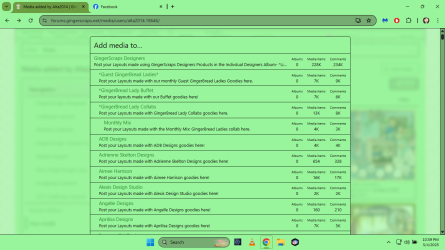
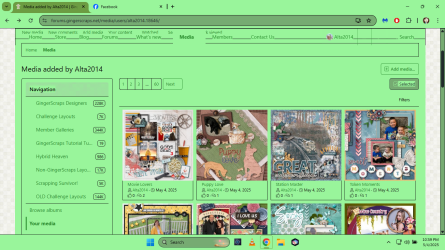
I need help with posting a layout in my gallery, and not in other galleries.


Screenshot (122).png
When I click on add media I get this
Screenshot (123).png
 
Hi Alta, sorry I couldn't help you help you last night. I had just logged off for the night and was spending time with my family.

This is what is should look like. You need to select the category that applies. Your layout will always apply to at least one of the categories. So just select the designers category, whose products you used. Then continue on to the next step, you can include additional categories as well.
Here is a tutorial that might be helpful.


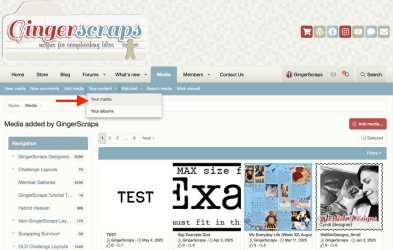
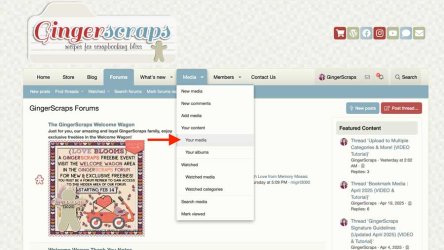
Everything you upload will always be included in "your media". Here are two screenshots of how you can find "your media".
Your_Media_1.jpgYour_Media_2.jpg
Please let me know if you have any other questions!
I can also make a tutorial uploading step by step, from start to finish, if that would be helpful let me know. I can put it on my "to do list" list for the week :)
 
You can edit the title, credits, description etc. You just can not replace the image itself. If you have a typo or mistake on the image, you will have to delete the incorrect one and upload the new one. :)

@GingerScraps I came here to ask if a new image can be uploaded - I just found a typo on my layout - so angry at myself! Looks like I'll have to delete it. I hope in the future we can get this option installed please.
 
@lebjs Jo, You could just edit the details in the gallery and share the correct journaling. That is if you do not want to go to the trouble of deleting the whole thing and upload again. You could create a new layout on your computer and share the correct one in the challenge thread if it is for a challenge. You can upload direct from computer to a post in a thread - click on the little scene logo beside the chain link then choose the little upload logo.
 
All good @A-M Anne-Marie - I hate typos so I've already deleted it and uploaded the new, correct, one. I was just annoyed at myself for missing it!
 
@GingerScraps I came here to ask if a new image can be uploaded - I just found a typo on my layout - so angry at myself! Looks like I'll have to delete it. I hope in the future we can get this option installed please.

As of today, there is no way to replace an image. You can edit the title, journaling, credits boxes and you can move the categories a layout is in, but you can not replace the actual image.
If the platform does any updates or add-ons that allow images to be replaced, I will for sure get that for GS!
 
Is there a way to delete your messages? I see the selected button but I don't see a way to check the ones you want to delete.
 
Reporting a Gremlin! I've logged in and out of the store a few times yesterday and today, and this message "Note: You Have Previously Purchased the Product Above!" is coming up on items I absolutely know that I haven't purchased. Just FYI.
 
Reporting a Gremlin! I've logged in and out of the store a few times yesterday and today, and this message "Note: You Have Previously Purchased the Product Above!" is coming up on items I absolutely know that I haven't purchased. Just FYI.
Yes, I'm aware of that one. Unfortunately, that one is proving to be very hard to fix! I have been working with the company that made the mod, they keep telling me it is fixed... then I go test it and let them know it is still not working. I'm REALLY hoping it will be working properly soon! Sorry about the trouble.
 
Hi. I'm not getting notifications when folks comment on my gallery items. Before, there was a way to choose to get notifications about comments, but I don't see that now. Do you know if there's a way to turn those on?
 
@pixleyyy Someone else might have the exact answer for you, but I think if you go up to your name on the top, left click on it and you will have a pull down menu. Choose Preferences and you will have a long list of choices for what you get notified for, and how you get notified.
 
  • Like
Reactions: A-M
Back
Top