• 🆘 Need Help? We’re Here for You!

    Have a question or need assistance? You’re in the right place! Whether you're new to GingerScraps or just need a little guidance, feel free to ask here. Our amazing admins and helpful community members are always happy to lend a hand. 💖

    Be sure to check out these helpful areas too:

    🔧 If you’re having trouble with an order or product download, please visit our Support Desk - we’re happy to help!

Forum & Gallery Troubleshooting Zone: Report Bugs, Gremlins & Glitches

GingerScraps

Administrator
Staff member
Troubleshooting Zone: Report Bugs, Gremlins & Glitches for the NEW FOURM AND GALLERY ONLY

If you have other issues, not related to the new forum and gallery or just something you need help with, that is not a bug or glitch, please do so in the general help area
HERE OR if you need any help outside the scope of this post or the help forum (for example order issues), send me a SUPPORT TICKET HERE

We are finally safe and sound in our comfy new forum & gallery!!
However that doesn't mean we won't still find a few issues. If you experience any Bugs, Gremlins & Glitches in the forum or gallery, please report them here! It will be a great way to try and keep things organized.

{KNOW ISSUES}

ISSUE
: Many credits and comments in the gallery did not transfer over properly, they look like a bunch of crazy characters.
STATUS {IN PROGRESS} : The expert that did the conversion unfortunately is very sick and he has not been able to work for a few days, he is going to look into it when he is well. I do not know if it is fixable at this time.

ISSUE: In the gallery you can only upload to 1 gallery
STATUS {IN PROGRESS} : We are working on getting an add-on to resolve this issue!
 
Last edited:
I have posted two challenges pages, I see others don't seem to have an issue with this, so I think I am just doing it incorrectly... I can't seem to link my forum entry back to the image in the respective gallery or in Cookie Jar... no matter how I try to add the link.. can anyone help me??
 
@Pixel Palette Have a look HERE for linking from gallery to Challenge thread

For Cookie jar - do like before when your image is open in the gallery copy the web link from at the top of your browser and paste that into your post in the Cookie Jar.

Hope this helps you.
Yes, I tried doing that too, but I still wasn't doing it right... worked easy for the Cookie Jar this time I tried it, it took a little creativity to get the link posted to the image and not a separate link in the forum... lol ... Thank you so much for responding!!
 
@3BluEyedBabies Linking is not available when you upload in the gallery other than just copying the full web address and paste that in your layout details. The only way around it is to do like I did for my layout HERE and add the link in the comment.
 
Anybody figure out how we can tag our layout for challenge and designers????? I did notice we can upload the LO into the reply to the challenge and then add a link so should we just do that and leave our layout in the gallery under the designer and then paste that link into the challenge post??
 
@Windscwept have a look HERE to see how to add your layout to a challenge thread.
There will eventually be a way to add your layouts to more than one gallery.
 
How are we supposed to link kits to the store?
For example, I usually type #2025 March Bundle by Connie Prince, but that doesn't work in the new gallery description...or maybe I'm just not seeing it?
Lynn by the moment you cannot link the name of the product to the store, but you can add the link into your description like I've done, simply write down the name, space and paste the link to the store, example
Layout created using #2025 March Bundle by Connie Prince
https://store.gingerscraps.net/-2025-March-Bundle-by-Connie-Prince.html

I've done that on my pages
 
  • Like
Reactions: Gen
My gallery came back in duplicate. Nearly every layout has a duplicate!

Question- there is no link from the forum to the store. I guess we open up two tabs?
 
@sharonbertolino If you are in the forum - just click on the little shopping trolley at the top and it will take you to the store. It opens in a separate tab so you are still open in the forum.
 
I must be doing something incorrectly although I did the same thing day before yesterday with no issue...

I keep getting Oops file too large message when I try to post a full size image into the forums...ie a challenge thread and Bakers Best. On two occasions I have copied the thumbnail until I figure out what I am doing wrong....Im sure it would be me and not the new site:) Any ideas?

Edit: Problem solved, I was copying the image from my gallery to paste in the thread as was my process on the old system and kept getting the Oops too large message
 
Last edited:
I must be doing something incorrectly although I did the same thing day before yesterday with no issue...

I keep getting Oops file too large message when I try to post a full size image into the forums...ie a challenge thread and Bakers Best. On two occasions I have copied the thumbnail until I figure out what I am doing wrong....Im sure it would be me and not the new site:) Any ideas?
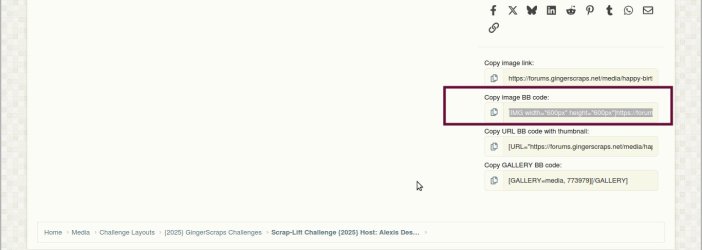
@Jill dear, copy the Copy image BB code, the second one
this 1.jpg
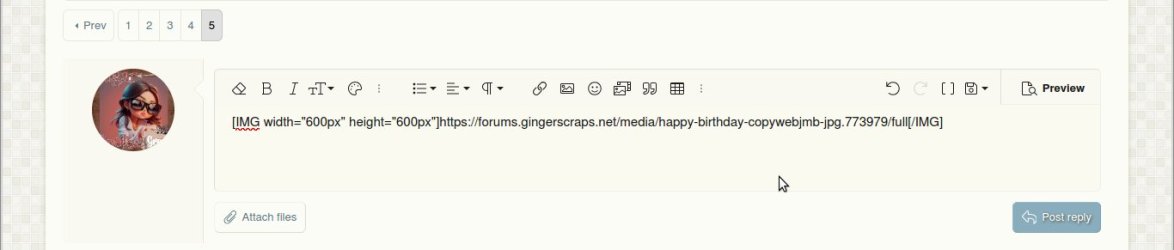
2. On the Baker's Best thread write down the name, etc. and paste the code
this 2.jpg
3. Go back to gallery, copy the URL link (at the top of the page),
Upload - track4.jpg
4. On the forum thread, select the code, click on the link icon and introduce the URL link, and post reply.
this 3.jpg
 
Last edited:
I keep running into trouble trying to get a media from the gallery pasted into a challenge thread. I keep getting the "oops" message. I tried copying both the "copy image link" and the "copy image bb code" as indicated above and neither worked. I also tried to past the page URL using the link tool. No go on any of it. The same thing happened to me a few nights ago. I was so frustrated I came back in the morning to load the photo into the challenge thread and didn't have any problem. Sadly, I don't even remember exactly how I did it. Are there clear instructions somewhere on the BEST method to paste a linked media from the gallery into a thread? Thanks!

Edited:
Well...I sort of got it to work. I managed to get the photo plugged in, but couldn't get the link to go on the image itself. I still have a weird URL hanging out behind it. Sigh. I know there is a way to do this easier.....
 
Last edited:
I keep running into trouble trying to get a media from the gallery pasted into a challenge thread. I keep getting the "oops" message. I tried copying both the "copy image link" and the "copy image bb code" as indicated above and neither worked. I also tried to past the page URL using the link tool. No go on any of it. The same thing happened to me a few nights ago. I was so frustrated I came back in the morning to load the photo into the challenge thread and didn't have any problem. Sadly, I don't even remember exactly how I did it. Are there clear instructions somewhere on the BEST method to paste a linked media from the gallery into a thread? Thanks!

Edited:
Well...I sort of got it to work. I managed to get the photo plugged in, but couldn't get the link to go on the image itself. I still have a weird URL hanging out behind it. Sigh. I know there is a way to do this easier.....
My dear sweet friend, you must copy the last one, not the image link, I did an small tutorial here please reach me if you have questions, I will be glad to help you my dear friend @Celestine
 
@GingerScraps I just uploaded my new signature in the media/gallery but as it is not for a challenge I looked for a "Members Gallery" like we had before but I could not find one. Is there one and I just could not see it?
 
I’ve had no issues outside of the known issues, but I’m curious if there’s an option to toggle on dark mode? That would be so cool for me during late nights but understand completely if that’s not an option!
 
I just uploaded the Daily Download for 3/25/2025 and it is a duplicate of the one posted for 3/24/2025?
Did the person posting the DD just make a mistake and it will be corrected later, or there will only be 30 postings in total for March and we have not missed a part of the two kits?

Well, I guess somebody fixed the DD posting for 3/25/25. Off to grab it.
 
Last edited:
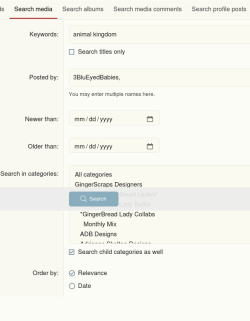
I have another slight problem, I used to search for my previous LOs in the gallery with the product name (for CT stuff) and now when I try to use the new search option, I am getting no results. Has anyone searched their gallery with results?
 
I have another slight problem, I used to search for my previous LOs in the gallery with the product name (for CT stuff) and now when I try to use the new search option, I am getting no results. Has anyone searched their gallery with results?
Actually with the new forum format is easier to find it
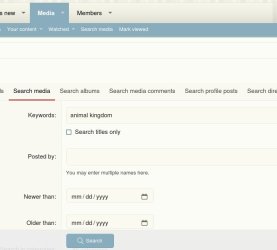
- Click Media ---> Search media ---> write down the name of the product ---> click search and all the layouts created using the same products will display
search.jpg
 
This is probably quite obvious, but I can't seem to find an easy way to reply to a thread without scrolling down to the bottom of the thread or clicking the "reply" button in the original post or a reply that quotes the original post. Is there a reply button somewhere at the top of the thread that I am missing?
 
This is probably quite obvious, but I can't seem to find an easy way to reply to a thread without scrolling down to the bottom of the thread or clicking the "reply" button in the original post or a reply that quotes the original post. Is there a reply button somewhere at the top of the thread that I am missing?
Kristi, I just clicked on the reply button in your post and it has quoted it. That would be the same if you clicked on the reply button on the opening post.
When you open a thread it should take you to the last posting, so no need to scroll to the bottom of a lot of postings.
 
How do you link a layout you post in the forum? Before you would copy the link for the layout post that so the layout would show up in the post and then you highlight it click the link that would take you to the layout in the gallery that is not working out for me I am just posting the links separate for the gallery.
I pmed you
 
Back
Top