• 🆘 Need Help? We’re Here for You!

    Have a question or need assistance? You’re in the right place! Whether you're new to GingerScraps or just need a little guidance, feel free to ask here. Our amazing admins and helpful community members are always happy to lend a hand. 💖

    Be sure to check out these helpful areas too:

    🔧 If you’re having trouble with an order or product download, please visit our Support Desk - we’re happy to help!

Trouble Posting

lilholmes6

GingerScraps Site Creative Team
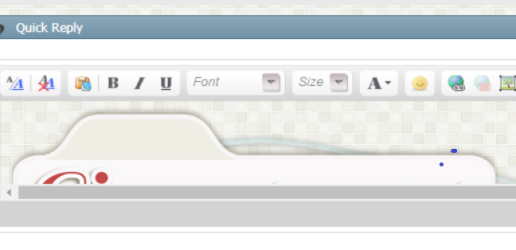
I need help!!! When I want post anything I push new thread or quick response and the box pops up. My problem is that inside the box the entire Gingerscraps forum page comes up in the box and won't let me post. The only way I'm able to post is to go into the forum through the page that comes up inside the box and push the new thread or quick response buttons again. So, I am writing a post within the post. Is this the way it's suppose to be? Surely not! Can someone please tell me how to get the forum page to stop coming up in the posting box. Does any of this make sense? Thanks so much for the help!!!
 
This doesn't sound familiar. I have not ever encounter what your are describing. What browser are you using? Are you working on a phone. tablet or computer. The only thing that I can think of is you may be accidently hitting the "Go Advanced" tab which looks quite a bit different but still not quite like what you describe. Possibly try signing out and rebooting your computer? Sorry I really can't offer any concrete help. Could you possibly upload a screenshot?
 
I'm working on a laptop and I'm using Chrome. I'm not using the "Go Advanced" unless I have to attach something. I'm going to attach a screenshot of my posting box. You'll be able to see the top of the Gingerscraps Forum at the top of the box. The entire thing is there. I actually have to go into it and find where I'm wanting to post and that's the only way I can post. How do I fix this where I can post in the regular forum?
 

Attachments

  • screenshot.png
    screenshot.png
    64.4 KB · Views: 57
I also have never seen or heard of this issue, this is very strange!
Can you possibly give me permission to operate as you so I can test that out, just to make sure it is not something in your account settings (although I don't even know of a way to make the issue you are describing to happen). If that is ok with you, I would need to change your password, log in as you, do some testing. Then once I am done I can PM you a new temporary password and you can log in and change it to whatever you want.

Sorry for the odd troubles! Hopefully I can figure it out. :)
 
You are more than welcome to do anything you need to do to see if you can fix the problem. I would be very appreciative!!!
 
Hi Ginger! I'm still having the same problem. it's also happening when I send messages. Have you figured anything out yet? Thanks in advance for your help!
 
{this is Ginger posting in lilholmes6 account}

testing post, in advance mode... all behaved as normal
 
{this is Ginger posting in lilholmes6 account}
testing in quick reply, all behaved as normal
 
Hi Lynn, This is Ginger, posting on my own account. I did all the tests I can think of and everything is normal on my end.
Unfortunately that means it is something on your end. I wish I could crawl into the computer and help you sort this out but that is not a possibility of course.

I will PM you your new password (I had to change it to operate as you). You should log in using the new password then go in and change your password to whatever you would like it to be.

The two most common solves to strange issues are
1. clearing your history/cache/and any saved website settings AND/OR
2. using an alternative browser.

Can you possibly try these ideas seeing if you continue to have troubles?

I really hate it when I can't get to the bottom of an issue I sure hope you can get it figured out!
 
That is very strange, never heard of that as an issue before... I also used Chrome never seen this happen before... Sorry I'm no help with this...
 
If you can't get it to work I would delete the account and rejoin the group again and see if it goes away... It's worth a try...
 
I'm happy to report that I got a reply from Lynn via PM and she let me know that the issue was indeed from the Chrome browser. She switched over to Firefox and is no longer having this issue :)
To be honest any time someone has a strange issue that is coming from their end, weather is be in the forum, shop or gallery, 9 out of 10 times it is due to Chrome browser. It just seems to be the most finicky browser.

So glad that Lynn is now able to post normally! :)
 
I am having the exact same problem as the screenshot that Lynn posted above. I've been researching on Google help and it suggested trying opening an "incognito tab" which I just did and I can post now with no problem. I cleared my 'cache' and that didn't help, either! HELP!! This is the only forum I am having this trouble on...Google chrome is updated...I'm using the https:// address...I guess I'll be posting INCOGNITO for a while...LOL!

Any suggestions, Lynn, on what you did that may help?! I don't want to go back to using firefox, though.
 
I am having the exact same problem as the screenshot that Lynn posted above. I've been researching on Google help and it suggested trying opening an "incognito tab" which I just did and I can post now with no problem. I cleared my 'cache' and that didn't help, either! HELP!! This is the only forum I am having this trouble on...Google chrome is updated...I'm using the https:// address...I guess I'll be posting INCOGNITO for a while...LOL!

Any suggestions, Lynn, on what you did that may help?! I don't want to go back to using firefox, though.

Below is a copy and paste from my update about Lynns issue.... Unfortunately it is coming from Chrome so the only "fix" is to use another browser until Chrome releases another update containing the "fix" for this issue.
-------------------------------------------------------------
I'm happy to report that I got a reply from Lynn via PM and she let me know that the issue was indeed from the Chrome browser. She switched over to Firefox and is no longer having this issue :)
To be honest any time someone has a strange issue that is coming from their end, weather is be in the forum, shop or gallery, 9 out of 10 times it is due to Chrome browser. It just seems to be the most finicky browser.

So glad that Lynn is now able to post normally! :)
 
YAY! Don't know what changed, but I'm finally able to post again without having to use an 'incognito' tab. What a nice surprise this morning!
 
YAY! Don't know what changed, but I'm finally able to post again without having to use an 'incognito' tab. What a nice surprise this morning!
The browser you use must have fixed the issue :)
I just hate it when there is an issue that I can’t fix (or pay someone to fix)! But when it’s a browser there is just nothing I can do.
So happy to hear it is working properly and not giving you trouble anymore! :)
 
Last edited:
I actually have been having the same issue lol! I also use Chrome. The way I get around it is by clicking on the little preview of the site in the reply box, and then I click on teh A/A button right above the box on the left. For some reason, this switches me to an empty box and I'm then able to reply. I actually was just going to switch to Edge, but I can't figure out how to link my layouts in threads with it! I'll have to do a little research on that. Right clicking my image in gallery doesn't give me the "copy link address" option that I'm so used to.
 
The browser you use must have fixed the issue :)
I just hate it when there is an issue that I can’t fix (or pay someone to fix)! But when it’s a browser there is just nothing I can do.
So happy to hear it is working properly and not giving you trouble anymore! :)

I think it is so comforting that the site owner cares enough to do whatever it takes to help. Even if you can't fix it, there is so much comfort in knowing you care. I honestly think that this is what makes GingerScraps the site that it is. You have created a culture of caring and encouragement and I love it.
 
Last edited by a moderator:
I think it is so comforting that the site owner cares enough to do whatever it takes to help. Even if you can't fix it, there is so much comfort in knowing you care. I honestly think that this is what makes GingerScraps the site that it is. You have created a culture of caring and encouragement and I love it.
Awe thank you so much Lynnie <3 you are so sweet!
 
Back
Top