
Navigation
Install the app
How to install the app on iOS
Follow along with the video below to see how to install our site as a web app on your home screen.
Note: This feature may not be available in some browsers.
More options
You are using an out of date browser. It may not display this or other websites correctly.
You should upgrade or use an alternative browser.
You should upgrade or use an alternative browser.
Template Files?
- Thread starter trina513
- Start date

Janytime
New member
I use psd files most often since my software is PhotoShop Elements. When I design, I save as psd, tiff, and png. For saving hard drive space, I just read and discovered the correct settings for saving tiff files to keep all the layers but save maximum space. I had been doing it but not exactly correctly for the space savings. Just proves there is always plenty to keep learning!

trina513
Designer: Dear Friends Designs
I use the Panstoria Artisan program, so it's strictly .page files for me. I love your Nifty 50 Templates that you have started making in .page files. I'll be very disappointed if you stop making the .page format.
This is the stuff we wanted to hear - if they weren't being used, we wouldn't continue to bug Meagan to make them for us - but since it appears that they're needed and wanted, we will definitely keep her busy!

trina513
Designer: Dear Friends Designs
.PSD only for me. I'm a Photoshop elements user and always will be. I should consider using tiff as it saves space but I do like all the layers of a psd
TiFF files are virtually identical as far as layers go - and they save smaller - which is why I've switched to them. I also get a "preview" in my folder of the template if its in TIFF vs PSD (I used to with PSD, but now I don't and I hate it!)
trina513
Designer: Dear Friends Designs
I used to use PSD then read that TIFF takes up less space. I've used TIFF for quite a few years now. I don't notice any difference in printing or saving time or anything with the switch. I haven't even payed much attention to whether or not TIFFs use less space. HAHA The one nice thing I've noticed is that a few photo book sites will accept TIFF files for uploading, so that's nice!
Yes TIFF do take up smaller space than PSD, for example for our newest templates releasing this week "Can't Get Enough" one of the PSD file is 16.7 MB, and the TIFF is only 4.95 MB
trina513
Designer: Dear Friends Designs
OK so for you PSE users out there, are you not able to use TIFF?

msbrad
GingerScraps Site Creative Team
PSD saves faster...in an Adobe program [hence....it is a PhotoShopDocument......just sayin'].
A tutorial I wrote...long time ago... a different site, but it is true all my stuff. And I did not feel like re-writing the tutorial.
https://app.box.com/s/jlse38ghcbh80z07qni02wd4a3w67t2f
My settings for TIFF:
LZW
Interleaved
IBM
ZIP
This ALWAYS saves me hard drive space.
m
[ps- old and experienced]
PSD users can use tiff
A tutorial I wrote...long time ago... a different site, but it is true all my stuff. And I did not feel like re-writing the tutorial.
https://app.box.com/s/jlse38ghcbh80z07qni02wd4a3w67t2f
My settings for TIFF:
LZW
Interleaved
IBM
ZIP
This ALWAYS saves me hard drive space.
m
[ps- old and experienced]
PSD users can use tiff
Last edited:

jencrook
New member
HOly smokes! I may go open up all my old PSD file and save them as TIFF so I can preserve the layers and then delete the PSD files. I have been at this for years 9 years now and I never knew! Learn something new everyday. I could probably free up about 100GB of space on this hard drive! Woo Hoo! Thanks ladies! I guess I never realized that TIFF kept the layers in tact.
trina513
Designer: Dear Friends Designs
HOly smokes! I may go open up all my old PSD file and save them as TIFF so I can preserve the layers and then delete the PSD files. I have been at this for years 9 years now and I never knew! Learn something new everyday. I could probably free up about 100GB of space on this hard drive! Woo Hoo! Thanks ladies! I guess I never realized that TIFF kept the layers in tact.
I know I switched a few years ago (but still have a TON in psd - just haven't taken the time to switch!)

Pippin
GingerScraps Site Creative Team
PSD saves faster...in an Adobe program [hence....it is a PhotoShopDocument......just sayin'].
A tutorial I wrote...long time ago... a different site, but it is true all my stuff. And I did not feel like re-writing the tutorial.
https://app.box.com/s/jlse38ghcbh80z07qni02wd4a3w67t2f
My settings for TIFF:
LZW
Interleaved
IBM
ZIP
This ALWAYS saves me hard drive space.
m
[ps- old and experienced]
PSD users can use tiff
But if you save them as a zip-file, don't you have to unzip it every time you use it? I hate unzipping.
trina513
Designer: Dear Friends Designs
But if you save them as a zip-file, don't you have to unzip it every time you use it? I hate unzipping.
No, I just double click and they open in PS!
 They do take a bit longer to open and save, or so they say, I haven't really seemed to notice too much!!
djp332
New member
I use PSE 12 and I can and do use TIFF files.
OK so for you PSE users out there, are you not able to use TIFF?
msbrad
GingerScraps Site Creative Team
No- not at all. They open just like psd. I don't know why they call it thatBut if you save them as a zip-file, don't you have to unzip it every time you use it? I hate unzipping.
PLUS *******
one can " view" tiff, in window explorer or regular folder...do not need to open photoshop.
m
msbrad
GingerScraps Site Creative Team
HOly smokes! I may go open up all my old PSD file and save them as TIFF so I can preserve the layers and then delete the PSD files. I have been at this for years 9 years now and I never knew! Learn something new everyday. I could probably free up about 100GB of space on this hard drive! Woo Hoo! Thanks ladies! I guess I never realized that TIFF kept the layers in tact.
thats was my wake up! Wow on the savings. I even wrote my own action for saving to tiff from psd.
m
trina513
Designer: Dear Friends Designs
Yes one of my favorite things about tiff is the "viewable" preview in windows explorer. I mentioned that earlier and Michi did again but I LOVE that when looking for templates!!
And Michi - too funny about the action - I wrote one as well! I'd open a bunch of psd, do a batch edit with the action and walk away for a while! I should start doing that again and finish!!
And Michi - too funny about the action - I wrote one as well! I'd open a bunch of psd, do a batch edit with the action and walk away for a while! I should start doing that again and finish!!
jencrook
New member
I think you ladies should share your action with those of us too lazy to figure it out and do it ourselves...LOL

Neverland Scraps
New member
I always use .tiff and once upon a time only used .psd because I scrapped with Paint Shop Pro.
When I sold in a store, even now when I make freebies, I always include .page files because I know there are so many people out there who use it. Keep including them so that they can use your fabulous templates and not be excluded or have to piece together the individual .png files to recreate your template!!
Oh yeah, congratulations on opening shop!! I'm so excited for you and Colleen!!
When I sold in a store, even now when I make freebies, I always include .page files because I know there are so many people out there who use it. Keep including them so that they can use your fabulous templates and not be excluded or have to piece together the individual .png files to recreate your template!!
Oh yeah, congratulations on opening shop!! I'm so excited for you and Colleen!!
Neverland Scraps
New member
.PSD only for me. I'm a Photoshop elements user and always will be. I should consider using tiff as it saves space but I do like all the layers of a psd
There is no difference in layers between a .psd or .tiff file. If your .tiff file is flat, then the creator of the template saved it on the wrong settings. If your .tiff file is larger than your .psd file, the creator saved it on the wrong settings.
This is the correct way to save as a .tiff
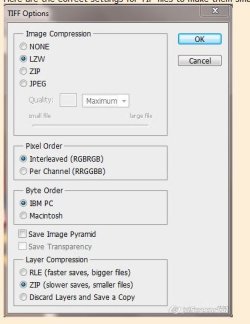
Last edited:

Kimberly27
New member
I just started deleting all the PSD files and keeping only TIFFs but was scared at first bc my old computer wouldn't recognize TIFF files for some reason. We don't know why it did that....

zanthia
GingerScraps Site Creative Team
psd
yes i know tiff saves space but for the small amount not worth it as tif files are so slow to save and when i scrap i constantly save.
yes i know tiff saves space but for the small amount not worth it as tif files are so slow to save and when i scrap i constantly save.
trina513
Designer: Dear Friends Designs
psd
yes i know tiff saves space but for the small amount not worth it as tif files are so slow to save and when i scrap i constantly save.
I save often as well (one too many times of having to start over on a LO!), and haven't noticed that much of a difference in save time. For the space it saves its worth it - IMO! That and the preview-ability of them!
trina513
Designer: Dear Friends Designs
Thanks again for all your input!! We'll definitely keep making psd, tiff & page!!
trina513
Designer: Dear Friends Designs
Oh yeah, congratulations on opening shop!! I'm so excited for you and Colleen!!
Thanks Wendy!! Been nice seeing you around again!!
Neverland Scraps
New member
Thanks Wendy!! Been nice seeing you around again!!
It's been nice being back!! I've missed everyone!

DigitalMcScrapper
Active member
I use mostly PSD but I used to be strictly PAGE until I learned Photoshop Elements. Now I prefer PSE13