• 🆘 Need Help? We’re Here for You!

    Have a question or need assistance? You’re in the right place! Whether you're new to GingerScraps or just need a little guidance, feel free to ask here. Our amazing admins and helpful community members are always happy to lend a hand. 💖

    Be sure to check out these helpful areas too:

    🔧 If you’re having trouble with an order or product download, please visit our Support Desk - we’re happy to help!

Question on Using Extract Now

Love using Extract now, but I have a question that I hope someone can answer. When I download a new kit, bundle or daily download, I create a Folder and put the downloads there. When using Extract now is there a way to have all the files extract into just 1 folder within that file? I hate having to open each folder and move them around withing the main folder. Does this make sense? Hope you can help. Thanks.
 
I use Extract Now but I have it set to download to just one file.
The best way for you would be - open up Extract Now... click on "settings" the little cog.... click Destination and choose "always ask where to extract files to". If you do this than you can always choose which file they go into and you can always change it back to only the one destination.
 
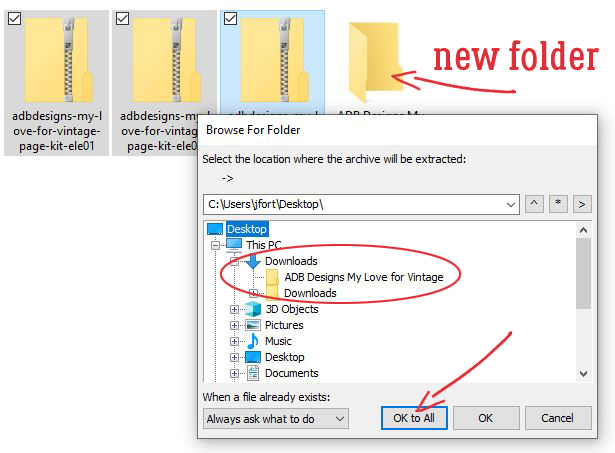
Since I just set up my new system recently, I can show you what I did with Extract Now. I went with the default setting for what to do with newly unzipped files, "Always Ask Where to Extract Files To", as already suggested. So when I click on the Extract button, this menu opens. I have my new folder for the Welcome Wagon kit there, and my folders selected and dragged onto the list. Clicking on the little (+) next to Downloads shows me what's in that folder. I chose my new folder, ADB Designs My Love for Vintage and then clicked on Ok to All. Boom. Done.

GS.jpg
upload.php
 
Back
Top