Need help with PSE stamping tool...

Sillz

New member
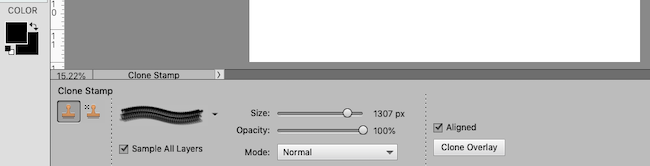
I'm trying to use a stamp but for some reason it isn't working. When I select the stamp I want from the list, it comes with a default size of 1307 that I don't seem to be able to change. Then when I try to stamp it, it doesn't stamp even though I am using black on a white background. I'm so confused. I have attached what my options look like and would like to know if there is anything wrong with them?
 

Attachments

  • Screen Shot 2018-10-27 at 3.56.38 PM.png
    Screen Shot 2018-10-27 at 3.56.38 PM.png
    35.5 KB · Views: 16
Sarah, That is the clone stamp tool which is used to cover up things in a photo. An example would be you have a lovely landscape view but unfortunately there is an unsightly telephone pole in the photo and it would be awesome to make it disappear. That is where the clone stamp tool comes in handy. With it you "sample" a nearby area by pressing ALT (on a PC) and clicking to pick up the sample. In the case of the telephone pole you would sample the nearby grass/lawn and then stamp over the telephone pole to make it disappear by replacing it with grass. By the looks of the brush preview you must have had a different brush selected from an earlier use. I usually use one of the default soft round brushes. The little icon next to is is for stamping with patterns that come with PSE or that your install/create. I haven't found a use for them. So- although it says "Stamp Tool" is is nothing like the stamps we find in the digital kits. Hope that helps.
 
Thank you so much! I did wonder whether I was using the right tool, but I couldn't think of what else to use. It has been a while since I used this. :)
 
Back
Top