I need help with a template in PSE

Sillz

New member
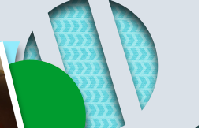
I was hoping someone could help me out with a template issue. I have only been using Photoshop Elements about a month and I am trying to do something that isn't going right. I know how to use clipping masks but that isn't working in this situation and that is about as far as my skills go. I have a layer that has cutouts in it that I would like to have covered in a paper I like and still preserve the cutout feature.

I have attached a piece of the cutout in case my description isn't making sense. The pattern in the background is the one I am trying to put on the top cutout layer.

Thanks!
 

Attachments

  • Screen Shot 2018-05-30 at 4.14.42 PM.png
    Screen Shot 2018-05-30 at 4.14.42 PM.png
    33.8 KB · Views: 18
Hi. Let me try this one. So, you want to clip a paper on the top layer with a cutout, is that correct?

If yes, all you have to do is put the paper on top of that layer with a cutout, and then use the clipping mask, the cutout shoud still be there, and you should still be able to see the blue paper at the back.

This one is an example where there is a heart shaped cutout. Hope this helps. :)

CG-aimeeh_heartfelt1bl.jpg
 
That's exactly what I did before and it didn't work. Now I've tried again and it suddenly works! Thank you!
 
It is the magic of having someone tell you exactly what you know and following their steps.

The last few days at work I was having a major problem with logging into the software that I use. I tried it daily and it was really hampering my job. SO... I sent a ticket to the help desk. I faithfully tried every day to login, nothing. The help desk guy walked up (he is about 6ft 5in I think, or maybe not, but he is very tall!) and said "Show me!" Well, I'll be darned if it did not work...

Go figure :)
 
Back
Top