

Grace.
Sugar Cookie : GingerScraps Praise Team {Lead}
Hi everyone, I have created a quick tutorial to help those who want to know how track gallery comments, just follow these easy steps.
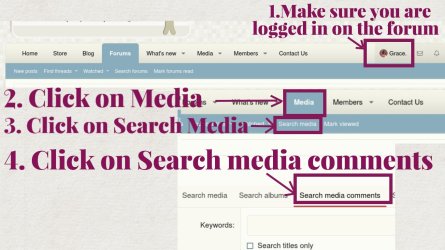
Make sure you are logged in on the forum.
Click on Media ==> Click on Search Media ==> Search media comments
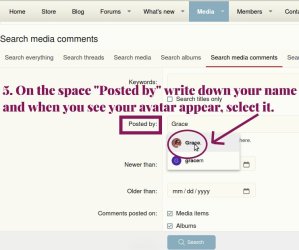
Skip Keywords and on the space "Posted by" write down your name, and when you see your avatar appear click on it, so it will be selected.
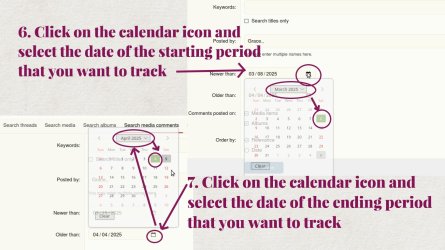
Go to Newer than: and click on the calendar icon, and set the date of the STARTING period that you want to track.
Go to Older than: and click on the calendar icon, set the date of the ENDING period that you want to track
Click SEARCH and the comments will show up.
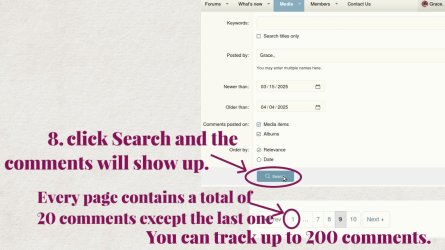
Every page contains 20 comments, except the last one if you have done less than 200 comments. In this way you can track up to 200 comments, with just one click. If you need to track more than 200 comments, just change the search dates in the calendars.
Make sure you are logged in on the forum.
Click on Media ==> Click on Search Media ==> Search media comments
Skip Keywords and on the space "Posted by" write down your name, and when you see your avatar appear click on it, so it will be selected.
Go to Newer than: and click on the calendar icon, and set the date of the STARTING period that you want to track.
Go to Older than: and click on the calendar icon, set the date of the ENDING period that you want to track
Click SEARCH and the comments will show up.
Every page contains 20 comments, except the last one if you have done less than 200 comments. In this way you can track up to 200 comments, with just one click. If you need to track more than 200 comments, just change the search dates in the calendars.


