• 🆘 Need Help? We’re Here for You!

    Have a question or need assistance? You’re in the right place! Whether you're new to GingerScraps or just need a little guidance, feel free to ask here. Our amazing admins and helpful community members are always happy to lend a hand. 💖

    Be sure to check out these helpful areas too:

    🔧 If you’re having trouble with an order or product download, please visit our Support Desk - we’re happy to help!

Help! Trying to credit properly in gallery

Firstoscartgrouch

GingerScraps Site Creative Team
Question on how to credit properly in gallery for Gingerbreadlady kitsimage.jpeg
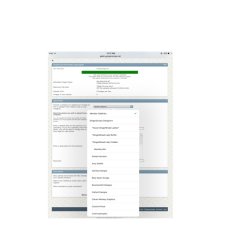

im confused if only designers chose the stared items? Or where we chose what to credit for Gingerbreadlady kits?
 
You most certainly are allowed to add your layouts to the designers galleries. If it's a collab or part of the Monthly Mix or Buffet, please feel free to add to those galleries as well! :)
 
Yes, I usually credit each designer that I use so that they can see the loveliness that you created with their product. If there is more than 1 designer - like a temp one and a kit one, I credit both. I usually upload to my own gallery first and then add the others as an edit.

Remember, that each "gallery" counts towards your daily total.
 
It's the GingerbreadLady kits that are confusing me. They have a * beside them that I can't figure out what that means.

For or example the I Believe in Love kit credit would go where?
 
The star might be so the Gingerbread Ladies go at the top in alphabetical order? I'm not sure.

I'd put it under Gingerbread Ladies Collabs.
 
It's the GingerbreadLady kits that are confusing me. They have a * beside them that I can't figure out what that means.

For or example the I Believe in Love kit credit would go where?

I believe it means that they sell exclusively at GingerScraps. Some of the designers sell at other stores as well.

When I upload a page, I choose "Members Gallery" and then type in the info in the description box, i.e. kit & designer name, template, font, etc. AFTER it's uploaded into the gallery, I then hit "edit photo" and copy the image to the appropriate galleries, such as the designers or specific challenge gallery.

I hope this helps.
 
Back
Top