Any Techies out there?? I need some help

geswho40

New member
I was hoping that maybe I would see if there are any "techies" here at GS that might be able to help me trouble shoot my 'puter issues. I can't seem to download and extract anything, even though I have tried downloading different zip file programs. I click on the link and it seems to be downloading it, but it doesn't go into a zip file that I can extract, it just gives me the Icon when I open it. I have tried right clicking and "open with" differnt programs, but that doesn't work. I must have lost something, or accidently deleted something at some point and have even tried restoring my 'puter back to an earlier time thinking that would fix it, but it didn't. I wasn't able to go back far enough, and of course I was an idiot and didn't make a restore point for a back up! I have paid to talk with a technician over the phone to walk me through and see if she could help, but nope. Installed a new driver and that didnt' work either...I'm so frustrated at this point, I wish there was someone who has had this problem that could help me, but not many people are familiar with digital scrapping so it's hard to get anyone to understand what my exact problem is...KWIM?
Anywho, has anyone ever had this problem, or do you have any idea what my computer is missing? Any help would be appreciated.
 
I am not a "real techi" but maybe I can help. Do you have the problem on every download or only on downloads from special places?

The first thing you could try: deactivate your antivirus programm and your firewall. Does the download work than?
 
The problem seems to be when I need to extract something, but then again, I tried downloading the font for the font challenge this month and it wouldn't do that either.
I will try to disable my anti-virus program next time and see if that works. Thank you, I appreciate your reply!
 
Well quite honestly I don't remember what my computer came with originally, because I accidently replaced it with 7 Zip. I didn't mean too, but I wanted to see if I could get a faster download with a different one, but when I decided that 7 zip wasn't really working for me either, I removed it and it took my original one with it. Does that make sense? Also, I have Windows 7 if that helps anyone, I forgot to mention that.
 
Windows 7 should have it's own extractor. It's not a separate program. If you right click on the file, do you have an option to "Extract"?

You can also try ExtractNow. I've been using it at work and at home. We get some stuff at work other than zip files and this usually extracts them all (plus it can do multiple files at once).
 
Thank you Stephanie, 7 did have one, but I accidently deleted it when I deleted 7 zip, so now I don't have one, and can't seem to get one to work now. I have tried right clicking too.
Kelly, No I didn't have the problem before I installed 7 Zip, and at this point, I'm not even sure if it's the extracter that's the problem, I just don't know :(
I might have to break down and bring it to someone, but I hate to have to do that, it's money that I don't have, right now, but I miss being able to play in the gallery. PLUS I have joined the new Digi County Fair challenge coming up....waaaaaaaa!
Thank you girls, I appreciate your feedback
 
Okay, try this: klick on your win symbol, there you should find a field to search. Copy and paste there

regsvr32 zipfldr.dll

your PC should find it, press enter and tell me what happens.
 
regsvr32 zipfldr.dll was loaded but entry point "DII Register Server was not found" That is basically the error message I got. That sounds bad since it's a Windows application. Thank you, this sounds like it could be the problem right?
 
yee haa now you're getting somewhere...told ya there was someone out that could help..or at least provide ideas...smart ladies here at GS!
 
Agreed! Unfortunately,I'm not getting anywhere because I need an admin P/W and since the one I have is not working...Ugh, I'm so sick of thinking about this and have so many other things I should be doing! CRAP!
 
For what it's worth, I have Win7 and use 7-zip. Toni, I hope you can get this problem resolved asap! Computer problems are such a pain!
 
I found a few things you can try.

First suggestion is to re-install 7-zip like Melly said.

If you want to restore you native windows zip file handling, the following seemed like the most simple and promising way to do it:

1.
  • Click the Windows Orb (Start) > All Programs > Accessories and right-click Command Prompt, then "Run as Administrator".
  • After the Command Prompt window opens, Type <code style="margin: 0px; padding: 0px; border: 0px; vertical-align: baseline; background-color: rgb(238, 238, 238); font-family: Consolas, Menlo, Monaco, 'Lucida Console', 'Liberation Mono', 'DejaVu Sans Mono', 'Bitstream Vera Sans Mono', 'Courier New', monospace, serif; white-space: pre-wrap;">assoc .zip=CompressedFolder</code> and press Enter.
  • Restart the computer.

I found these in a discussion forum along with a few other suggestions. One didn't seem to work completely for everyone, and one involved some pretty complicated manual registry edits, which probably isn't something you want to mess with. Hopefully, one of the previous suggestions will help get you unzipping again.

Let us know how this turns out. If it still doesn't work, there still might be more you can try.
 
Oh thank you ladies, you're the best! Cathy, I have re-installed 7zip and the Dll file is still missing. I have tried the Command Prompt, admin way, but my P/W doesn't work and can't get any further without it :( If I would have been smart, I would have made a backup from a previous time, but I'm not that smart :( I am running a software that someone from the Microsoft forum suggested I try to see if it can find the lost files/registries and replace them. I am at work right now, so when I get home tonight I will see if it was able to help or not. If not, I throw my hands up in the air and wave the white flag....Stick a fork in it...blah.
I REALLY appreciate all of the help you have given me, thank you!
 
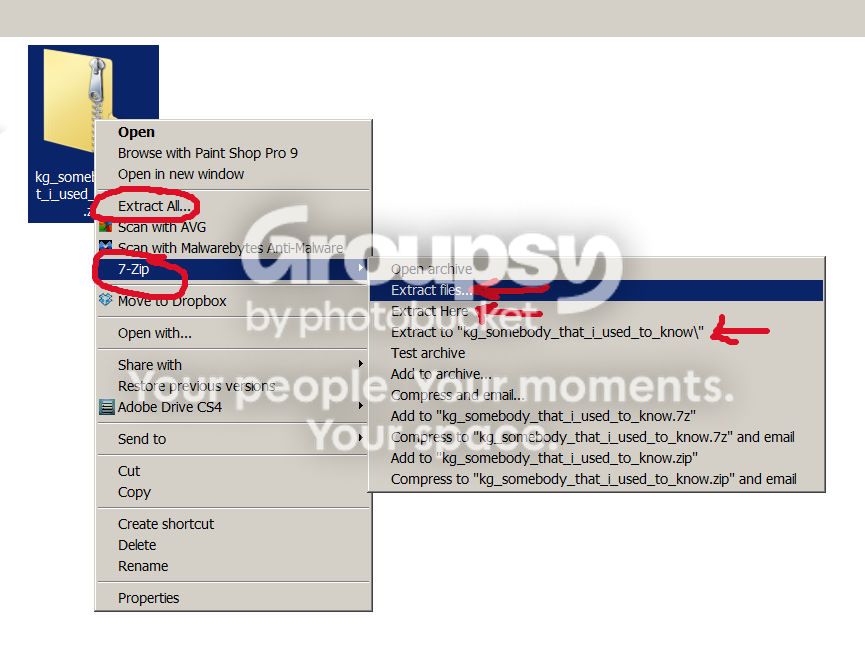
Toni, if you right-click on any zip file, can you tell me what you see in the menu that comes up? Here is a screenshot of my menu when I click on this month's font challenge zip: Really, I'm looking to see if you have either the Extract All command and/or the 7-Zip command menu like I have circled below.

Interestingly, I tried the regsvr32 zipfldr.dll command on my Windows 7 machine and got the same error you did. However, I can unzip files with no problem, using both the native windows zip handling and 7-zip, so I'm not sure that it necessarily means that something is wrong.

Also, have you tried opening the actual 7-zip program from the start menu? Click Start Menu - 7-Zip - 7-Zip File Manager, then trying to unzip from there. If you're not an administrator (or don't have correct password), then the integration of 7-Zip with Windows 7 may not have been implemented correctly. But, you might still be able to unzip through the 7-Zip program itself.

AAAscreenshot_zpsc85f8700.jpg
 
I am at work right now, but I can tell you that I do see 7Zip when I right click, and I have also opened it from the start menu, and when I try to extract it, it says error....00000blahblahblah. I would be happy to show you tonight when I get home from work, but that won't be until about 8p Central :(
Do you know what program the extracted file opens with? I'm wondering if that might be part of my problem too, because when I open my downloads file, the newest ones I've tried extracting have just an Icon instead of the file folder that my others have. When I click on it I get the 00000*** error (can't remember off hand what it was), but when I hover over it, it lists what's supposed to be in the file...does that make sense?
I'm so sorry to be taking up so much of your time, I appreciate your help!
 
Thank you Kelly, that looks like it's for XP but I can look at see if it's revelent to my problem. I called hubs at home and had him read the error code I wrote down yesterday. He said he couldn't read my writing (shocking!) so this is a guess, but I tried looking it up and didn't get anything helpful:
0x80000009 (or a) It's so hard not being home right now, dang! Lol. Thanks again
 
Lol, ohhh I'm so sorry I got your name wrong, but thank you for correcting me, ugh. I looked the error code up too and got the same info you got, but one site said the 0x8000000A means there is a problem that is causing the photo error code, so it's probably all related. You are so kind to spend so much time on this with me, and you have been so helpful, I appreciate it more than you know. Especially since English is a second language to you, so that takes extra effort!! Thank you, Thank you, Thank you!:kisses
 
I downloaded and ran the above Melly, and I'm not sure that it helped :( I restarted my computer and tried one of my downloads and when I click on it to extract it all I get is that 0x8000000a an error is preventing the photo or video from being displayed. Something's really not right because there should be a zip file there and all I have is an icon, like a windows icon. Before I would click on it and it would ask me where I wanted to extract it to...but now I immediately get that error message. I'm too tired to do anymore tonight. Thanks again for your help Melly, you're a doll!
 
I thought I would remember how to take a screen shot, and I even looked in my help menu, but that wasn't helpful either. The zip folder icon you have up there is what I used to see after downloading and before extracting, but now all I get is a windows Icon. I'm so sorry, I am just pooped and can't think about this anymore tonight. I so appreciate your help though, thank you!

Toni, if you right-click on any zip file, can you tell me what you see in the menu that comes up? Here is a screenshot of my menu when I click on this month's font challenge zip: Really, I'm looking to see if you have either the Extract All command and/or the 7-Zip command menu like I have circled below.

Interestingly, I tried the regsvr32 zipfldr.dll command on my Windows 7 machine and got the same error you did. However, I can unzip files with no problem, using both the native windows zip handling and 7-zip, so I'm not sure that it necessarily means that something is wrong.

Also, have you tried opening the actual 7-zip program from the start menu? Click Start Menu - 7-Zip - 7-Zip File Manager, then trying to unzip from there. If you're not an administrator (or don't have correct password), then the integration of 7-Zip with Windows 7 may not have been implemented correctly. But, you might still be able to unzip through the 7-Zip program itself.

AAAscreenshot_zpsc85f8700.jpg
 
You have helped me Melly, you are the one that figured out what the problem was. If not for that I would still be at square 1. I wish I was better at giving the proper information so you can better understand what my problem is.
You have summed it up perfectly, you have been a huge help so thank you very much!
 
Back
Top