• 🆘 Need Help? We’re Here for You!

    Have a question or need assistance? You’re in the right place! Whether you're new to GingerScraps or just need a little guidance, feel free to ask here. Our amazing admins and helpful community members are always happy to lend a hand. 💖

    Be sure to check out these helpful areas too:

    🔧 If you’re having trouble with an order or product download, please visit our Support Desk - we’re happy to help!

Resizing

BarbRapp

New member
I'm very new to digital scrapbooking, like under a week new! lol I decided to do a challenge, but can not upload my file as it's too large. I use photoshop elements, for under a week now as well. lol Can anyone help this dummy with how I have to save a file to upload in to the gallery and challenge threads? Please and Thank You!
 
Welcome to the world of digital scrapbooking. I hope you are enjoying this new adventure. Learning can be enjoyable but so frustrating. Just keep asking questions and learning. My directions are from PSE 2018 so hopefully they will be similar to your version.

There are different ways- I am just giving you the quick easy one for now.

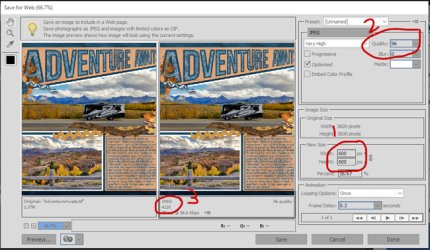
1. Once your page is finished got to the menu commands File> Save for Web
2. A new window will pop up with different fields to adjust the size and quality of your page for uploading to the web.
3. I first change the width and heighth to 600x600-(in the middle of the window - Step 1) that is the maximum size for Gingerscraps Gallery
4. Then I go up to the top of the window (Step2) and make sure the file format is set to JPEG and then adjust the quality until the estimated file size is just under 450kb (limit for GS gallery file size) I start with 100 and dial it down as needed.
5. You can see the estimated file size in step 3.
6. Click on Save and give the save for web file a different name than your high resolution document. I always use the following Naming format for my web files Title-of-Page-web. For example the title of the my page in the attached preview was Adventure Awaits so I named my file Adventure-Awaits-web.

Save-for-Web2.jpg
 
I use an action for that, fast and easy :). There's a free one available. If you are interested, send me a PM, I'll give you the link where to find it.

I'm very new to digital scrapbooking, like under a week new! lol I decided to do a challenge, but can not upload my file as it's too large. I use photoshop elements, for under a week now as well. lol Can anyone help this dummy with how I have to save a file to upload in to the gallery and challenge threads? Please and Thank You!
 
Thanks so much ladies! I'll try the PSE directions first, but I think I tried something about web saving on there and the function wasn't available. It could be because I'm on a trail version of PSE until I get my new laptop set up. I wanted to be sure I was going to like digital before I opened the new laptop. I don't like it. I LOVE it, so it's coming out of the box as soon as licensing is over at work! :)
 
Back
Top