

mary-lynne
Member
[FONT="]Just got PSE 2023; was using 2020. What a piece of junk. Items are not showing in the layers panel unless I drag them to the layout from the bin. If I drag them from the work space the layers panel shows a new layer, but nothing in it. Note that the layers are fine in my layout, they just don't show in the layers panel. Very hard when you are trying to click on a layer and can't see it in the panel. If it gets accidently put under an overlay, you can't click on it in the doc.[/FONT]
[FONT="]
[/FONT]
[FONT="]Even worse, the masks always look empty! I've filled them with black so I can do selective masking and it doesn't show![/FONT]
[FONT="]
[/FONT]
[FONT="]If you close the file and reopen, everything shows, but anything new you add is blank! [/FONT]
[FONT="]
[/FONT]
[FONT="]Have emailed Adobe Support and put the question in the Community Forum...Nothing[/FONT]
[FONT="]
[/FONT]
[FONT="]See attached....gone back to 2020.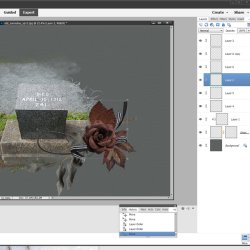 [/FONT]
[FONT="]
[/FONT]
[FONT="]Even worse, the masks always look empty! I've filled them with black so I can do selective masking and it doesn't show![/FONT]
[FONT="]
[/FONT]
[FONT="]If you close the file and reopen, everything shows, but anything new you add is blank! [/FONT]
[FONT="]
[/FONT]
[FONT="]Have emailed Adobe Support and put the question in the Community Forum...Nothing[/FONT]
[FONT="]
[/FONT]
[FONT="]See attached....gone back to 2020.
[/FONT]


