• 🆘 Need Help? We’re Here for You!

    Have a question or need assistance? You’re in the right place! Whether you're new to GingerScraps or just need a little guidance, feel free to ask here. Our amazing admins and helpful community members are always happy to lend a hand. 💖

    Be sure to check out these helpful areas too:

    🔧 If you’re having trouble with an order or product download, please visit our Support Desk - we’re happy to help!

How to LINK images from the gallery to threads

Grace.

Sugar Cookie : GingerScraps Praise Team {Lead}
How to LINK images from the gallery to threads

Hi everyone, I have created a mini-tutorial to help those who don't know how to link images from the gallery into a thread, just follow the next steps.
 
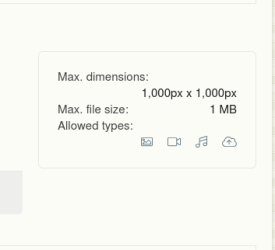
1. Upload your layout in the Gallery, remember the max. file size is 1 MB, and the max. dimensions 1000 x 1000 px. I save my page as 600 x 600 px
limit size.png
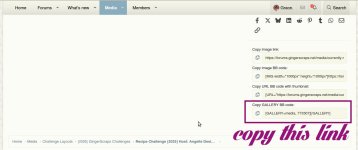
2. Scroll down your page and copy the last code named "Copy GALLERY BB code"
1.jpg

2. Go to the forum, to the thread that you want to post your page, paste the code into your reply and post it, and it will be done.
2.jpg
 
Last edited:
@A-M I think now it's clear :) in case that anyone needs a fast instruction how to link the image. I love how easier it's to link images from gallery into forum threads with the new format.
 
Thank you so much, @Grace. It couldn't be easier and thank you for putting this tutorial together!!!!!! Incredibly useful stuff.

As an aside, from someone NOT intimately familiar with the GingerScraps Forum, this thread, Forum/Gallery/Site Tutorials, Rules and Questions is really buried. I spent about 10-15 minutes two different days looking for Gallery rules (size maximum, loading and linking), and never managed to find them. I mess around on a few scrapping sites, take fairly long breaks from time to time, and I forget the loading details for the different sites, so finding these operating rules with ease is important.

May I suggest that these details or links to these details be placed as "sticky" threads at the top of either Welcome Wagon or Site News and Announcements, or as a sub tab under "Media," where newer people are likely to look for this information? This topic is the LAST thread under Cookbook/Tutorials, and honestly, to me, tutorials mainly imply techniques for digital scrapping or photo editing software rather than rules on the mechanics of operating in the gallery and forum, and this is illustrated by the vast majority of posts in the Tutorial section. I didn't even browse this section looking for Gallery rules.

I know these operational rules are likely out there somewhere on the forum, but not easy to find. @GingerScraps I thought I would tag you as well. I know you are crazy busy, but maybe this is easier to resolve while all these changes are happening. I do want to say that I am loving the new gallery and maneuvering. It is truly nice and you have done such a terrific job. And I know I will probably have mud on my face when you say, "Here it is!" and it is a completely logical place. :rolleyes:
 
@Celestine dear so glad that the tutorial help you. I totally agree with you Ginger has done such terrific job, I too LOVE the new forum and gallery!
I went to check out the headlines in the forum, and under Tutorials, there's a description
*Forum/ Gallery/ Site Tutorials, Rules, and Questions
maybe it'd be necessary to highlight the text in bold letters, so folks can find it easier. Thank you so much for the feedback.
 
Last edited:
@Grace. I keep getting an oops something went wrong message. I can add my photo to the forum but I can't get the link to the gallery to add to my picture. It is just listed below the picture. I can't figure out what I am doing wrong. HELP!
 
Last edited:
@Grace. I keep getting an oops something went wrong message. I can add my photo to the forum but I can't get the link to the gallery to add to my picture. It is just listed below the picture. I can't figure out what I am doing wrong. HELP!
My dear, just post your image in the gallery, then scroll down and copy the "Copy GALLERY BB code", is the last one, and paste straight into the reply and will post your image and link it to gallery at the same time.
 
Thank you so much, @Grace. It couldn't be easier and thank you for putting this tutorial together!!!!!! Incredibly useful stuff.

As an aside, from someone NOT intimately familiar with the GingerScraps Forum, this thread, Forum/Gallery/Site Tutorials, Rules and Questions is really buried. I spent about 10-15 minutes two different days looking for Gallery rules (size maximum, loading and linking), and never managed to find them. I mess around on a few scrapping sites, take fairly long breaks from time to time, and I forget the loading details for the different sites, so finding these operating rules with ease is important.

May I suggest that these details or links to these details be placed as "sticky" threads at the top of either Welcome Wagon or Site News and Announcements, or as a sub tab under "Media," where newer people are likely to look for this information? This topic is the LAST thread under Cookbook/Tutorials, and honestly, to me, tutorials mainly imply techniques for digital scrapping or photo editing software rather than rules on the mechanics of operating in the gallery and forum, and this is illustrated by the vast majority of posts in the Tutorial section. I didn't even browse this section looking for Gallery rules.

I know these operational rules are likely out there somewhere on the forum, but not easy to find. @GingerScraps I thought I would tag you as well. I know you are crazy busy, but maybe this is easier to resolve while all these changes are happening. I do want to say that I am loving the new gallery and maneuvering. It is truly nice and you have done such a terrific job. And I know I will probably have mud on my face when you say, "Here it is!" and it is a completely logical place. :rolleyes:
Thank you for this input! I have been working on reorganizing and renaming subforms to make things easier to find :)
 
Is this info still accurate? cause its not working for me, none of my links to the gallery are showing up, help anyone or @GingerScraps I'm sorry ahead of time if i'm being dumb, but i can't figure this out. TY
 
Yes, this is still accurate. I'm not sure what you mean by none of your links are showing up. Do you mane in the forum, like when you post your page isn't showing up?

When you view a page in the gallery, is you scroll down to the bottom right, you will see the list of links. Use the "Copy GALLERY BB code"
Then just copy that and pate it righting your forum post.
I can put it on my list to make a video tutorial if that would be helpful :)
Let me know :)
 
Back
Top