• 🆘 Need Help? We’re Here for You!

    Have a question or need assistance? You’re in the right place! Whether you're new to GingerScraps or just need a little guidance, feel free to ask here. Our amazing admins and helpful community members are always happy to lend a hand. 💖

    Be sure to check out these helpful areas too:

    🔧 If you’re having trouble with an order or product download, please visit our Support Desk - we’re happy to help!

Changing Colors in PSE

Sillz

New member
I have a page border that is black and I want to turn it white so I can put it on a black background. Could someone please tell me how to do that in PSE?

Thanks!
 
There are a couple ways.
1. You could clip a white paper to it- same way as you do clipping masks. Or a patterned paper might have interesting results.

2. Set your foreground color chip to white - have the border layer selected in the layer panel and press Shift+Alt+Backspace/Delete Both work) To explain the difference - Alt+Backspace would fill the whole layer with the new color- Adding the Shift key to the combination will only change the existing pixels. This is the method I use all the time now for changing a color since I learned about it.

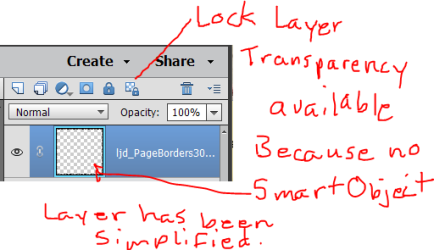
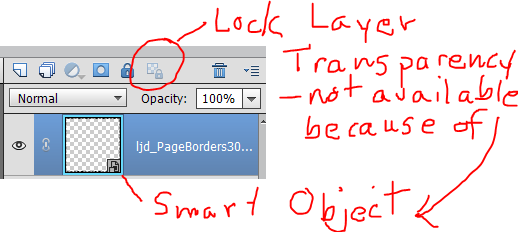
3. With the border layer selected - right click on the layer and choose Simplify Layer (this is if it has the little Smart Object symbol on the layer icon. It is in the bottom right corner of the icon) If there is no Smart Object indicator on the icon then you don't have to Simplify. At the top of the layers panel - the last icon is the Lock Transparency. Click on it to lock the transparent pixels and then with the foreground color selected and border layer active press Alt+Backspace or use the Bucket tool to Fill.
 

Attachments

  • Layer Transparency 1.PNG
    Layer Transparency 1.PNG
    22.2 KB · Views: 17
  • Layer Transparency 2.PNG
    Layer Transparency 2.PNG
    25.6 KB · Views: 17
Thanks for the help! Are these instructions for a PC or Mac? I'm on a Mac and #2 doesn't seem to work. For #3 the Simplify Layer option is greyed out.
 
For mac I think it would be Shift+Option+Backspace( or Delete)

For #3 - if Simplify is not available then the border you are trying to use must not be a Smart Object (I use PSE 2018 and that may be a new feature - older versions may not have the Smart Object) Is the Lock transparency icon colored or faded? If it is isn't faded you should be able to click on it.
 
Back
Top