• 🆘 Need Help? We’re Here for You!

    Have a question or need assistance? You’re in the right place! Whether you're new to GingerScraps or just need a little guidance, feel free to ask here. Our amazing admins and helpful community members are always happy to lend a hand. 💖

    Be sure to check out these helpful areas too:

    🔧 If you’re having trouble with an order or product download, please visit our Support Desk - we’re happy to help!

a quick tutorial on using the quotes in threads

DebraB

Active member
Is there a tutorial on how to use the quotes when you are wanting to respond to someone's comment on a thread?
 
Let’s see if I can show you from my phone…
I’m already in bed and relaxing… but maybe this will work. If not, I’ll make better instructions tomorrow :)
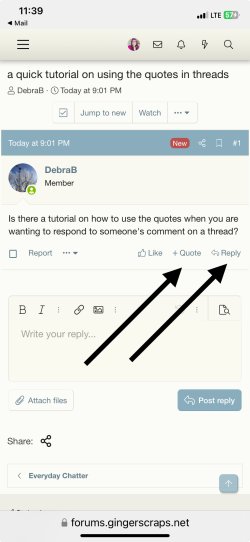
So you should see the +quote, that would be when you want to select multiple posts to reply back to all at once.
You’ll also see the reply button. You can click that one to just reply to one person, it will quote what they said, and then you can reply.

Let me know if that makes sense. :)
 

Attachments

  • IMG_4039.jpeg
    IMG_4039.jpeg
    408.1 KB · Views: 1
Is there a tutorial on how to use the quotes when you are wanting to respond to someone's comment on a thread?
Example
Let’s see if I can show you from my phone…
I’m already in bed and relaxing… but maybe this will work. If not, I’ll make better instructions tomorrow :)
So you should see the +quote, that would be when you want to select multiple posts to reply back to all at once.
You’ll also see the reply button. You can click that one to just reply to one person, it will quote what they said, and then you can reply.

Let me know if that makes sense. :)
 
Let’s see if I can show you from my phone…
I’m already in bed and relaxing… but maybe this will work. If not, I’ll make better instructions tomorrow :)
So you should see the +quote, that would be when you want to select multiple posts to reply back to all at once.
You’ll also see the reply button. You can click that one to just reply to one person, it will quote what they said, and then you can reply.

Let me know if that makes sense. :)
It worked to just hit the post reply Button. Thanks for explaining the simple things.....and thanks for taking the time to reply las night when you were in bed, but please be sure to take time you need, you have worked so hard.
 
Great! I’m happy to help :)
I’m here anytime you need something!
And thank you for your kindness, I really appreciate it ❤️
 
Back
Top