• 🆘 Need Help? We’re Here for You!

    Have a question or need assistance? You’re in the right place! Whether you're new to GingerScraps or just need a little guidance, feel free to ask here. Our amazing admins and helpful community members are always happy to lend a hand. 💖

    Be sure to check out these helpful areas too:

    🔧 If you’re having trouble with an order or product download, please visit our Support Desk - we’re happy to help!

New to PSE - How to view PSD files

So, I finally installed my new PSE 10 and now I can't figure out how to view any of the PSD files, like templates and things on my computer. When I go to my folders on windows all I see is a blue PSD icon, but no image. I've been playing around with the organizer that came with PSE, but it seems like it's going to be a ton of work and that every time I add something new I'd have to remember to go back in and import it into the organizer.

I loved that my old PSP had a browser within the program that automatically checked each folder for images each time I opened it or went to that folder.

I'm a template junkie, so I'm super disappointed that I can't seem to figure out how to look at them all without opening every single one....Help!
 
The only way I know how to do this is when you start from the program PSE10 and click FILE then OPEN. In this window ytou can view the psd files.
 
hmmm. I am lost then. Do they not have jpeg files as well?

Some of them don't as I didn't save them or keep them all in the past....I'm better about that now....it would be alot of work to go back and resave a jpeg for each of them, but I may end up having to do that anyway.

Maybe try this: https://psdviewer.org/

I do not have this but saw it and thought it might work for you.

I will look into this and see if it helps at all.


So, do you use the organizer feature? I can't decide if it's worth all the time it will take to import all my stuff into it and then I have TONS of scrapbook stuff and imagine it will bog down the organizer in the long run
 
I do not have that program at all, was just trying to lok for something that might help.

Some of them don't as I didn't save them or keep them all in the past....I'm better about that now....it would be alot of work to go back and resave a jpeg for each of them, but I may end up having to do that anyway.


I will look into this and see if it helps at all.


So, do you use the organizer feature? I can't decide if it's worth all the time it will take to import all my stuff into it and then I have TONS of scrapbook stuff and imagine it will bog down the organizer in the long run
 
Are you on a pc or a mac?
I have a few ideas if your a mac girl :) but I don't know much about pc's anymore. Let me know :)
 
I don't have any ideas either. On my PC, the only way that I can view PSD docs is when I do what Missi said above with clicking on open when I have PS open. :(

Not sure about Mac yet. I am waiting to get PS installed on it. ;) lol
 
I'm on a PC not a mac :(
Ok... well then I'm not sure I can be of much help :(
BUT- there are lots of ladies here that use PSE and a PC... hopefully someone has an answer for you! That would drive me nuts if I were you! I have tons of PSD files it would be really annoying if I could not view them!
 
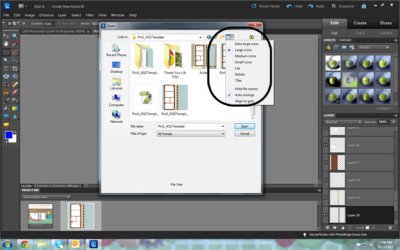
You got me curious so I downloaded the free trial of Elements 10. To open a file, it is: File, Open... you should see a browser window with the contents of your folder.

Oh, also, did you restart your computer after install?
 
I STILL have not installed my PSE 10 but was thinking to this weekend. I am curious as to what Amy is talking about when she talks ab0ut "the organzier" and is it worth taking all the time to import into it???
 
Here's a screen shot of what I see...

Darn, that is not what mine looked like at all....wonder if it's some setting on my computer. I'm on Vista and I noticed my PSP files that I used to use also didn't show up when I was 'exploring', but they at least would show up for me in the Paint Shop program. I read about something that you can download and add to your registry that's supposed to work. I may try that as otherwise I'll be super frustrated!!

Thanks for all your help so far ladies!
 
Back
Top